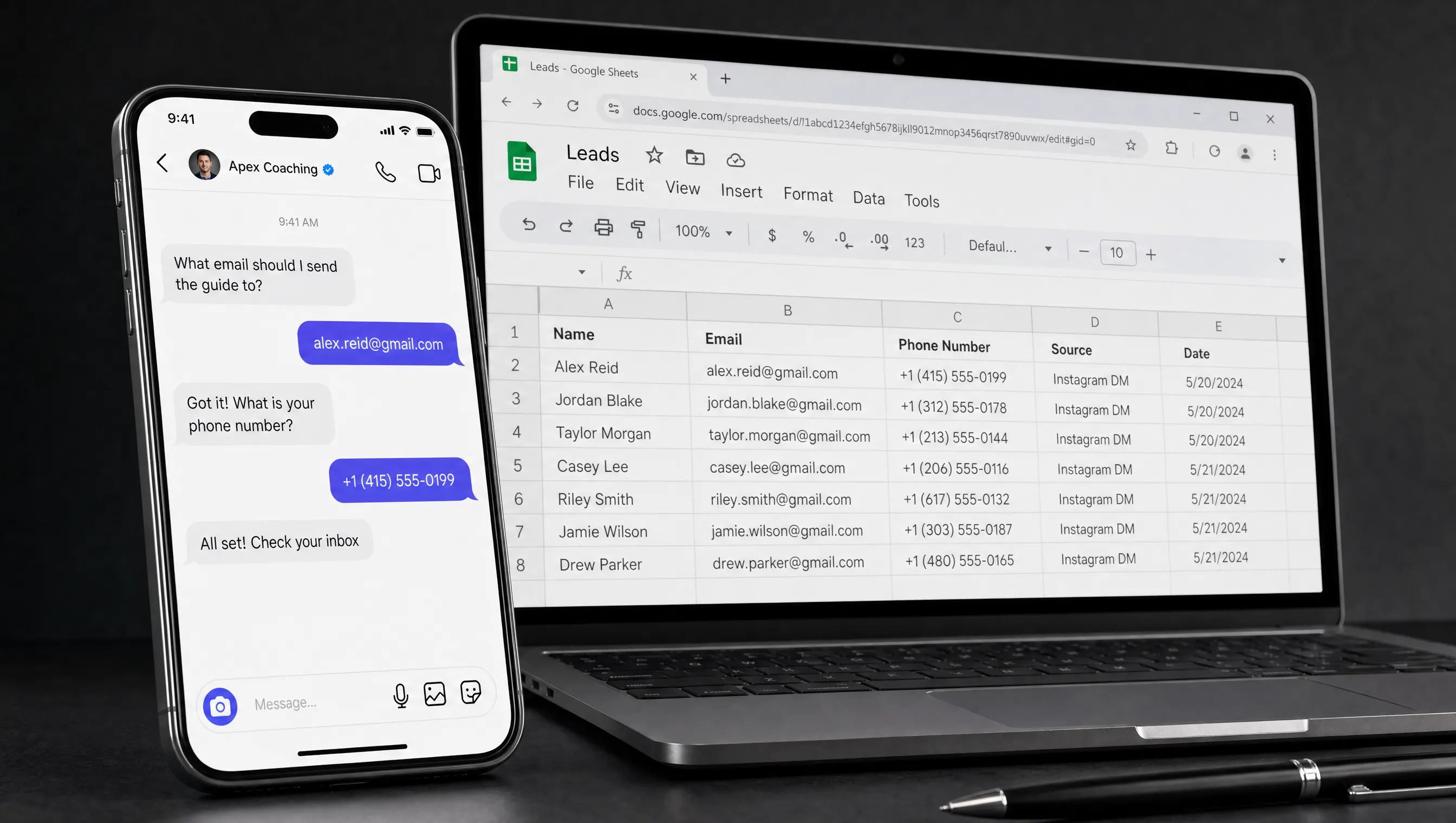
Why Your Email List Should Start Inside Instagram DMs
You do not own your Instagram followers. If Meta changes the algorithm tomorrow, or your account gets flagged for a policy you did not know existed, that audience disappears. The only asset you truly control is a list of email addresses sitting in your own database. That is not a controversial take. Every marketer knows it. The question is how you build that list.
The traditional approach looks like this: post content, add "link in bio" to your caption, hope someone taps your profile, scrolls past your highlights, finds the link tree, clicks the right link, lands on a form, and enters their email. That is seven friction points between interest and capture. Conversion rates reflect it. Most link in bio funnels convert between one and three percent of visitors.
Collecting emails inside Instagram DMs collapses that entire chain into two steps. Someone comments a keyword. Your automation asks for their email inside the same conversation thread. They type it. Done. The resource arrives in the same message window. No app switching. No external landing page. No seven step drop off funnel.
I want to be upfront about something: we built this feature because we saw the same pattern in our own data. During the early months of building AutomateYourDM, I replied to every DM manually for thirty days. Four out of five messages fell into the same categories. One of the most common: "Can you send me the link?" followed by "What is your email so I can send more?" That two message exchange became the blueprint for what is now our multi step flow system.
How Lead Capture Actually Works Inside a DM Flow
Most guides describe DM lead capture as "ask for their email in DMs." That is true at a surface level but skips the mechanics that make it reliable. Here is how we actually built this.
A standard DM flow in AutomateYourDM consists of connected nodes. Each node sends a message and can include buttons for the user to tap. But there is a second type of node: the input capture node. Instead of presenting buttons, this node sends a prompt and waits for a free text reply from the user. When they respond, the system captures their message, stores it as a lead field, and advances the conversation to the next node.
The technical flow looks like this:
Comment Triggers the Flow
A follower comments your keyword on a Reel or post. The automation sends them a DM with your greeting message and the first question.
Input Node Asks for Email
The first input capture node sends a message like "What email should I send the guide to?" The system waits for their free text reply.
Response Gets Captured and Stored
The moment they reply, the system stores their response as an encrypted lead field, creates or updates their lead record, and advances to the next node.
Flow Delivers the Resource
The final node sends the promised resource: a link, a PDF, a discount code, or a CTA button to your checkout page. The lead is now in your dashboard.
Each lead gets one record per flow. If the same person triggers the flow again, the system updates their existing record instead of creating a duplicate. The field values themselves are encrypted at rest, so even if someone accessed the raw database, the email addresses and phone numbers would be unreadable without the decryption key.
Setting Up Your First Instagram DM Email Capture Flow
The entire setup takes under five minutes. Here is the exact sequence you would follow in AutomateYourDM to create a flow that collects emails when someone comments a keyword.
Create a New Trigger DM Flow
Open your dashboard, go to the Trigger DM Flows section, and create a new flow. Give it a clear name like "Free Guide Email Capture" so you can identify it later. Set your trigger keyword. Pick something natural that people already type in comments. "GUIDE" works. "INFO" works. "XYZPROMO2026" does not.
Write Your Root Message
The root node is the first message your automation sends. Keep it warm and direct. Something like: "Hey, thanks for your interest. I have the guide ready for you. Quick question before I send it over." This sets the tone. It feels like a real person responded fast, not like a template fired from a queue.
Add an Input Capture Node for Email
Add a new node and set its type to "Collect Info." Select "Email Address" as the field type. Write the prompt message: "What email should I send the guide to?" The system will wait for the user to type their email address as a free text reply. Once they respond, the value gets captured and encrypted automatically.
Add a Delivery Node with Your Resource
Connect a final node that delivers the actual resource. This can be a message with a URL button linking to your PDF, a checkout page, or a landing page. Keep the message short: "Done. Check your inbox in the next few minutes. Here is the direct link in case you want it now." Include a URL button pointing to the resource.
Toggle the Flow Live
Save the flow and toggle it to active. Assign it to the specific post or Reel where you want the trigger to fire, or apply it as a global page config rule so it works across your entire account. Post your content with the CTA: "Comment GUIDE to get the free PDF."
How to Get Phone Numbers from Instagram DMs
The mechanic for collecting phone numbers is identical to email capture. You add an input capture node, set the field type to "Phone Number," and write a prompt. The only difference is in how you frame the ask, because people are more protective of their phone number than their email address.
Context matters here. If you are a fitness coach offering a free meal plan, asking "What is the best number to text you the plan?" feels natural. If you are a SaaS company offering a blog post, asking for a phone number feels aggressive and unnecessary. Match the ask to the value of what you are offering.
When to Collect Email
Lead magnets, PDF guides, course waitlists, newsletter signups, discount codes, and any resource that lives in an inbox. Email is the default choice for most use cases.
When to Collect Phone Number
Appointment booking for service businesses, SMS reminders for live events, high ticket sales callbacks, and local businesses where texting is the primary communication channel.
You can collect both in a single flow. Add an email input node first, then chain a phone number input node after it. Just know that every additional question increases friction. Two fields is a reasonable ceiling for most flows. Three fields will cause a measurable drop in completion rate.
Instagram DM Email Capture vs Traditional Methods
Here is a direct comparison of the most common ways to capture leads from Instagram, measured by conversion rate, data ownership, and setup complexity.
| Lead Capture Method | Avg Opt In Rate | Data Ownership | Setup Effort |
|---|---|---|---|
| Link in Bio Landing Page | 1% to 3% | Full | Medium |
| Instagram Lead Form Ad | 8% to 15% | Partial | Medium |
| Manual DM Conversations | 40% to 60% | None | High |
| Automated DM Lead Capture Flow | 45% to 70% | Full | Low |
The conversion rate difference comes down to friction. A link in bio funnel asks someone to leave the app, load a new page, find a form, and type their information into a web form on a mobile browser. A DM flow asks them to reply to a message. The environment is familiar. The action is simple. People are already in conversation mode when they open their inbox.
I have a strong opinion on this: stop treating DM automation like email marketing. An Instagram DM is a conversation, not a broadcast channel. If your automated reply reads like a newsletter signup form, you have already lost. The flows that convert best feel like a real person responded quickly. Short messages. Natural language. No "Dear valued subscriber" energy.
Where Your Captured Lead Data Goes
Every email address and phone number collected through your flows lands in your Leads dashboard. Each lead record contains the Instagram username of the person, the specific flow that captured them, every field value they provided, and the exact timestamp of when the data was captured.
Encrypted at Rest
All personal data is encrypted at rest before it hits the database. Even raw database access would not expose email addresses or phone numbers without the decryption key.
One Lead Per Flow
If the same person triggers your flow twice, the system updates their existing record instead of creating a duplicate. Your export stays clean without manual deduplication.
CSV Export Ready
Download your leads as a CSV file from the dashboard. Import directly into Mailchimp, ConvertKit, Klaviyo, Google Sheets, or any email marketing platform that accepts CSV uploads.
Here is how we actually built the storage layer. When a user responds to an input capture node, the processing service checks if a lead record already exists for that person in that flow. If it does, the new field gets appended to the existing record. If not, a new lead is created. The username is resolved asynchronously from Meta's API so the capture does not wait on a network call. The field value itself goes through our encryption converter before touching the database. This was a deliberate design choice. We considered storing plain text (simpler, faster queries) but decided that anyone handling personal contact information should encrypt it by default, not as an afterthought.
Where to Go from Here
Collecting emails through DMs is one part of an effective automation setup. These related guides explore the surrounding mechanics in depth:
- How to Automate Instagram DMs walks through the core architecture of setting up direct message triggers from scratch.
- Instagram Comment Automation Guide details how to turn public Reel comments into private inbox triggers that initiate lead flows.
- Why Link in Bio Is Dead breaks down why traditional landing page links lose over ninety percent of prospective leads.
- Is Instagram Automation Safe? explains the official Meta Graph API rules that keep your account compliant and protected.
Frequently Asked Questions
Yes. You can manually ask every person who messages you to share their email. The problem is speed and consistency. If a Reel generates 200 comments in an hour, you physically cannot reply to all of them before people lose interest. Automation handles the volume while keeping the conversation personal.
When using a tool built on the official Meta Graph API, yes. The automation only responds to people who engage with your content first, which means every conversation is user initiated. AutomateYourDM also encrypts all captured lead data at rest, so personal information is protected from the moment it enters your dashboard.
The system captures whatever text the user provides. It does not validate email format in real time because adding a validation gate mid conversation creates friction that kills conversion rates. Most users provide real contact info when they genuinely want the resource you offered. If data quality is a concern, filter your exported leads by checking for common patterns like missing @ symbols.
Yes. Your leads dashboard lets you download all captured data as a CSV file. From there, you can import directly into any email marketing platform. The CSV includes the Instagram username, email, phone number, the flow that captured them, and the timestamp.
There is no hard limit on the number of input capture nodes in a flow. However, every additional question adds friction. In practice, collecting two fields (email plus one more) tends to deliver the best balance between data depth and completion rate. Three or more fields cause noticeable drop off.
Yes. Story reply triggers use the same multi step flow system as comment triggers. You can post a Story saying "Reply GUIDE to get the PDF" and the triggered flow can collect an email before delivering the resource. The mechanic is identical.