Why Coaches Lose Leads on Instagram (and What to Do About It)
You post a Reel about your coaching framework. It performs well. Comments start coming in. People are writing "how do I sign up?" and "do you have a free version?" and "what does this cost?" at 10 PM on a Thursday.
You see those comments the next morning. By then, half of those people have scrolled past 200 other posts, followed someone else, or simply lost the spark that made them comment in the first place. That gap between when someone shows interest and when you respond is where coaching leads die.
Instagram DM automation for coaches solves exactly this problem. When someone comments a trigger keyword on your post, they get a DM within seconds. Your booking link, your free resource, your intake form. Delivered instantly, while their interest is at its peak.
Here is what that looks like in practice. There is a common belief that automation is something you earn after reaching a certain follower count. That is backwards. Automation is a growth tool, not a reward for already being big. A coach with 800 followers who automates replies on a well performing Reel can grow faster precisely because of the engagement loop. More replies mean more engagement signals. More engagement signals mean the algorithm pushes your content further. The only real prerequisite is having content worth engaging with.
New to comment automation? Start with our guide to Instagram comment automation for the full breakdown of how comment to DM triggers work.
Step by Step: Setting Up Your First Coaching DM Flow
The part most people skip is planning what the DM should actually say. They jump straight to the tool, pick a keyword, and fire off a generic "here is your link" message. That works, but it leaves value on the table. Let me break this down properly.
Connect your Instagram account
Sign up for a Meta approved DM automation platform. During onboarding, you authorize the tool through Meta's OAuth flow. Your password is never shared. The only requirement is an Instagram Business or Creator account linked to a Facebook Page.
Need the full walkthrough? Our step by step guide to automating Instagram DMs covers the entire onboarding process.
Choose your trigger keyword
Pick a word that your audience would naturally type. "PLAN" works for a coaching blueprint. "CALL" works for a discovery session link. "GUIDE" works for a free PDF. The keyword should match whatever you promised in your content.
Worth noting: your keyword should be one word, all caps in your CTA, and something people would not accidentally type in a casual comment. "YES" is risky. "BLUEPRINT" is not.
Write the DM message in your voice
Your automated DM should sound like you typed it on your phone between coaching sessions. Not like a newsletter. Not like a sales page. Conversational, direct, and short.
Example DM for a coaching lead magnet:
"Hey, thanks for commenting. Here is the coaching blueprint I mentioned. It covers the exact framework I use with my 1:1 clients. Let me know if you have questions after reading it. And if you want to talk through how to apply it to your situation, I have a few discovery call spots open this week: [booking link]"
Add qualification, optional but recommended
If you are selling high ticket coaching, sending a raw booking link to everyone wastes your time. Use a multi step flow to ask one qualifying question before revealing the link. Something like "Are you currently running a coaching business or just getting started?"
The answer tells you whether this person is ready for your program or needs your free content first. Both outcomes are fine. The point is routing them to the right next step.
Post your content and let it run
Publish a Reel, carousel, or story that delivers genuine value and ends with your CTA. "Comment PLAN to get the free coaching blueprint." Then let the automation handle the rest. Every comment with that keyword gets a DM. You just create the content.
Choosing the Right Trigger Keywords for Your Coaching Business
Your trigger keyword is the hinge of the entire funnel. Pick the wrong one and your automation fires on every casual comment. Pick the right one and it captures exactly the people who raised their hand for your offer.
A creator with 45K followers was running a comment to DM flow with the trigger keyword "GETLINK." Engagement was low. Maybe 3 to 5 triggers per post. They switched to "INFO" because that is what people were already typing in comments organically before the automation existed. Same content, same audience, same posting schedule. Triggers jumped to 40+ per post.
Keywords that work for coaches
Keywords to avoid
Quick win: check your last 10 posts and look at what people are already typing in the comments. If you see "how much" or "how do I start" repeatedly, those phrases (or short versions of them) are your best keyword candidates.
Want the full breakdown on keyword triggers? Read our keyword trigger automation guide for advanced techniques.
Lead Qualification: Filtering Prospects Inside the DM
Sending your booking link to every person who comments is fast, but it fills your calendar with people who are not ready to invest. Lead qualification inside the DM solves this. Ask one or two short questions before revealing the link, and you will only book calls with people who match your ideal client profile.
The goal is not to create a 10 question intake form. That belongs on a separate page. Inside the DM, keep it to two questions maximum. Just enough to separate "I am curious" from "I am ready."
Example qualification flow for a coaching business:
Trigger fires: "Thanks for commenting. Quick question before I send the link: are you currently coaching clients, or still building your practice?"
If "coaching clients": "Great. Here is my calendar link for a discovery call. I have openings this week: [link]. Looking forward to chatting."
If "still building": "No worries, everyone starts somewhere. Here is my free coaching blueprint to help you get your first clients: [resource link]. When you are ready for 1:1 support, reach out."
Both paths deliver value. Both paths leave the door open. The difference is that your calendar only fills with people who are actually ready.
Three Coaching Workflows You Can Copy Today
These are actual flows you can build in under 10 minutes each. No complex branching. No custom fields. Just the workflows that coaching businesses use most.
Workflow 1: Lead Magnet Delivery
Trigger: Someone comments "GUIDE" on your Reel about coaching tips.
An online course creator was manually replying to every comment on their launch posts. They would post a Reel, get 300+ comments saying "COURSE," and spend 3 hours copy pasting the same DM with the enrollment link. They set up a comment to DM flow that took 10 minutes. The next launch post got 400 comments, all 400 received the DM with the link within seconds, and they spent zero hours on manual replies. They said the tool "gave them their launch day back."
Workflow 2: Discovery Call Booking with Qualification
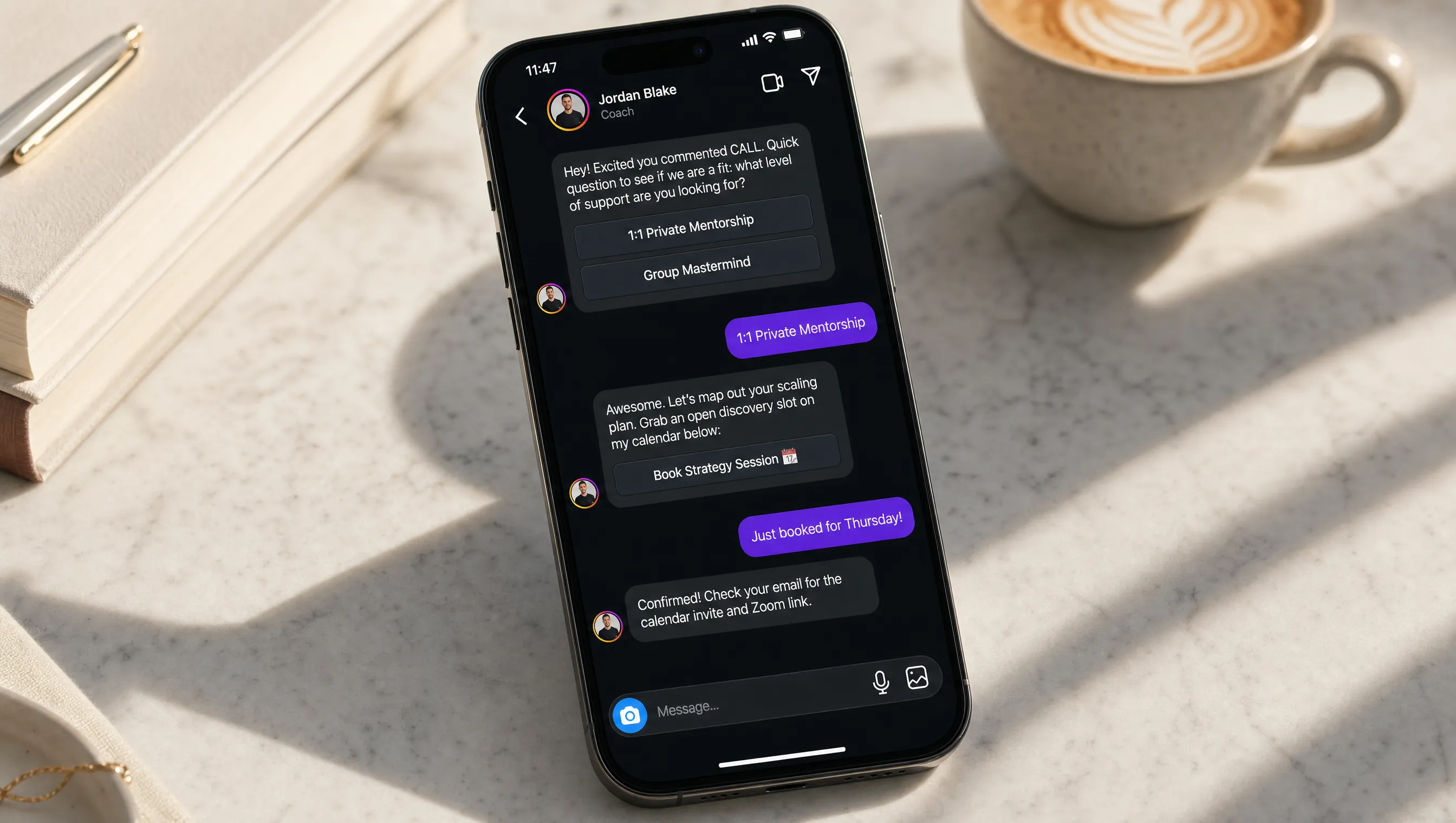
Trigger: Someone comments "CALL" on your post about client results.
This is the highest converting flow for coaches selling programs above $500. The qualification step filters out curiosity clicks and ensures every call on your calendar has real intent behind it.
Workflow 3: Webinar Registration via Story Replies
Trigger: Someone replies "REGISTER" to your story about an upcoming live workshop.
For the full guide on setting up story reply triggers, read our Instagram story automation guide.
Use AI to Answer Coaching FAQs Automatically
Beyond keyword triggers, there is a second layer of automation that most coaching businesses overlook: AI powered responses for general DM questions.
Coaches receive the same five questions over and over. "What does your program include?" "How long is the commitment?" "Do you work with beginners?" "What results have your clients gotten?" "How much does it cost?" These are not keyword triggered interactions. They are organic DMs from people who found your profile and want to learn more before reaching out formally.
With a knowledge base setup, you upload your program FAQ, pricing details, and testimonials as documents. The AI reads them and answers questions accurately, in a natural tone, without you typing a single reply. It is not a generic chatbot. It is answering from your actual business data.
Looking for a Different Automation Feature?
AutomateYourDM has several automation features designed for different use cases. If you are a coach looking for something specific, here is where to look.
If your coaching style involves delivering resources, booking calls, or answering the same common questions repeatedly, automation is perfect for handling that. For the deeply personal, one on one conversations that build real coaching relationships, keep those manual while automation handles the rest.
If you want to capture leads from post and Reel comments, comment automation is a great starting point. When you add a CTA like "Comment PLAN to get the blueprint," every comment becomes an engagement signal. More comments push your post further in the algorithm, which brings more eyeballs, which generates more comments. The automation creates a flywheel: your audience comments, they get a DM, your post reaches further, new people see it, and they comment too. Read our guide to Instagram comment automation for the full setup.
If your audience interacts more through stories than feed posts, lean into story reply automation. Some coaching niches (wellness, mindset, fitness) see 3x more story engagement than post engagement. If that describes your audience, set up keyword triggers on your stories so that anyone who replies with a specific word gets an instant DM with your resource or booking link. Our Instagram story automation guide walks through the exact setup.
Frequently Asked Questions
No. Automation works at any follower count. A coach with 500 followers who automates replies on a strong Reel will capture more leads than a coach with 50,000 followers who replies 6 hours late. The prerequisite is having content worth engaging with, not a follower threshold.
The DM appears in their inbox exactly like a message you sent manually. There is no "automated" label visible to the recipient. That said, write your messages in your own voice. A robotic template will feel robotic regardless of how it is delivered.
Yes. Multi step DM flows let you ask for an email address mid conversation. The system captures the response and stores it in your leads dashboard. You can then export those emails to your newsletter or CRM.
As long as you use a tool that connects through Meta's official Graph API via OAuth, yes. These tools operate within Instagram's own ecosystem and respect rate limits by design. The risk comes from unofficial tools that scrape data or require your password.
The automation fires the DM instantly, but you can always follow up manually afterward. Many coaches let the automation handle the initial resource delivery, then jump into the conversation once the prospect responds. The automation starts the conversation. You close it.
Yes. You can set up multiple keyword triggers, each linked to a different DM flow. For example, "PLAN" sends your free meal plan, "CALL" sends your booking link, and "GUIDE" delivers your PDF workbook. Each keyword runs its own automation independently.
The Comment to Client Funnel (How DM Automation Works for Coaches)
Every coaching DM funnel follows the same four stage structure. The beauty of it is that stages one through three happen automatically. You only show up for stage four: the actual conversation.
Content with a CTA
Post a Reel or carousel that delivers value and ends with a clear call to action. Something like "Comment PLAN to get my free coaching blueprint." The keyword needs to be short, memorable, and natural.
Instant DM delivery
The moment someone comments your keyword, two things happen: they get a public reply acknowledging the comment, and they get a DM with your resource or booking link. All within seconds.
Qualification questions
Before sending the calendar link, your flow asks one or two screening questions. "Are you currently running a coaching business?" or "What is your biggest challenge right now?" This filters out browsers and surfaces serious prospects.
Booked call
Qualified prospects receive your direct booking link. They pick a time while the conversation is still warm. You show up to a call with someone who already told you their challenge and confirmed they are ready to invest.
The difference between this and a link in bio approach is speed. A link in bio waits for someone to navigate to your profile, scroll down, find the link, and click through. A DM arrives in their inbox before they have even finished reading the other comments on your post.