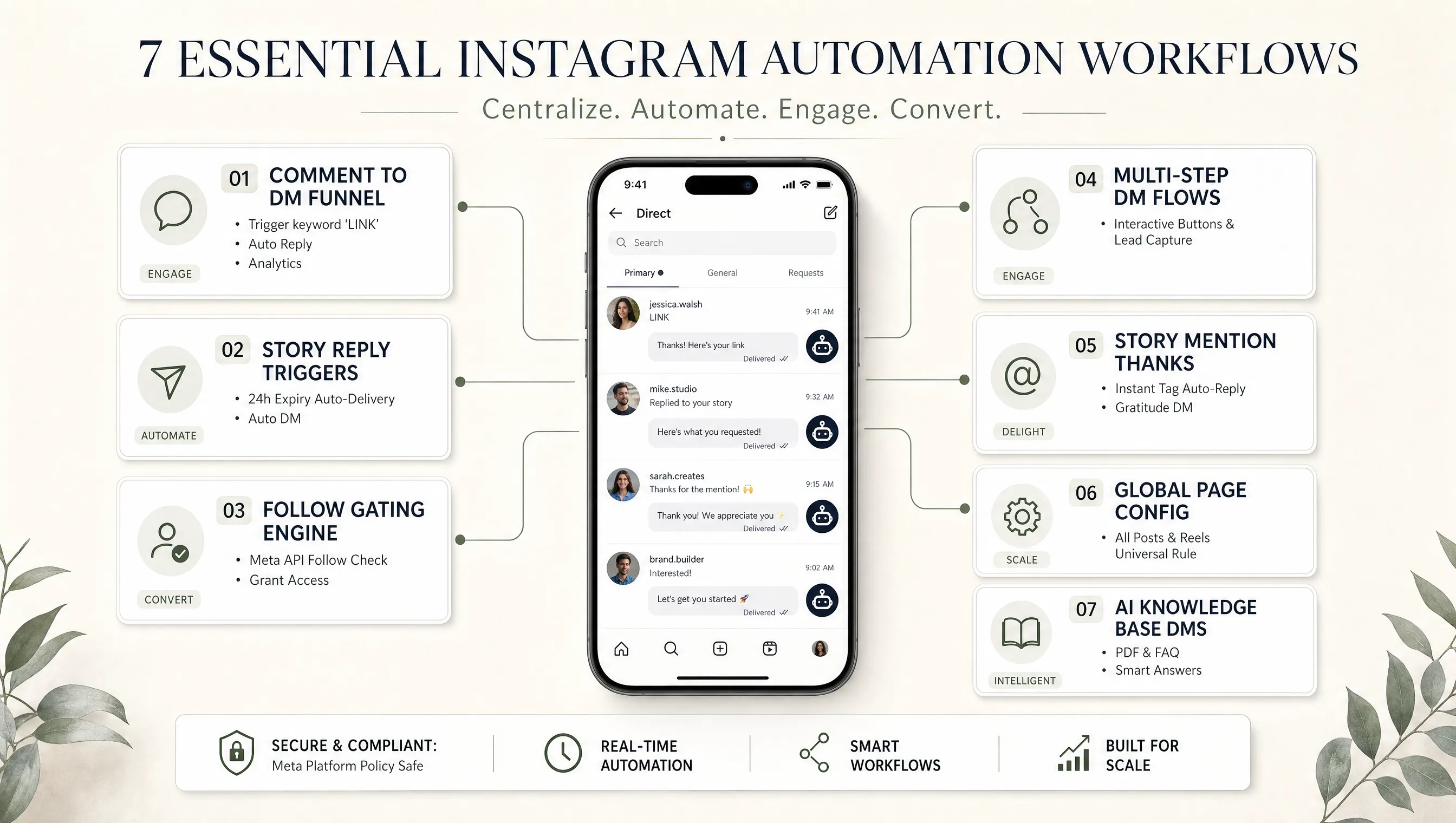
Why Most Creators Only Use One Instagram Automation Workflow (and Leave Growth on the Table)
Most creators set up a single comment to DM trigger, call it done, and never touch their automation settings again. That one flow handles maybe 30% of the conversations they could be capturing. The other 70% walks away.
Instagram gives you multiple surfaces where people interact with your content: comments, DMs, story replies, story mentions, Reels. Each surface is a different moment of intent, and each one needs its own automation workflow to capture that intent before it fades. Someone replying to your Story is in a different headspace than someone commenting on a week old post. Your automation should reflect that.
Here are the seven Instagram automation workflows that cover every major interaction point. Set them all up once, and they run around the clock without you touching them again.
Workflow 2Story Reply Automation for Lead Capture
Stories disappear after 24 hours, but the leads you capture from them do not have to. This workflow monitors replies to your stories for specific keywords. When someone replies with the keyword, the system delivers your resource straight to their DM inbox.
Here is what that looks like in practice: you post a Story with a text overlay that says "Reply BLUEPRINT to get the free guide." A follower types "blueprint" as a story reply. Within seconds, they receive a DM with the download link. The DM even includes story context so it reads naturally, not like a random message.
Time sensitive offers
Stories expire in 24 hours, which creates natural urgency. Pair that with an automation that delivers the offer instantly, and you capture interest at peak curiosity.
No per story setup
Configure the trigger keyword once. Every future story that uses that keyword in the CTA will trigger the same flow. One setup covers weeks of stories.
For the full setup walkthrough including story mention responses, check our Instagram story automation guide.
Workflow 3Follow Gating to Grow Your Audience While Delivering Value
Follow gating adds a single condition to any of your comment automation flows: before delivering the DM content, the system checks whether the person follows you. If they do, they get the resource immediately. If they do not, the system sends a friendly message asking them to follow first.
Once they follow and tap the confirmation button, the resource unlocks. No manual checking, no honor system. The system uses Meta's official API to verify the follow status in real time.
Keyword Comment
Someone comments your trigger keyword on a Reel.
Follow Check
System verifies follow status via Meta API. Not following? Asks them to follow first.
Content Unlocks
After following and confirming, the DM content delivers instantly.
This is the simplest growth hack in Instagram automation. You are already giving away something valuable. Adding a follow step before delivery trades that value for a genuine new follower. The conversion rate is surprisingly high because the person has already shown intent by commenting the keyword. They want the resource. Following is a small step to get it.
Workflow 4Multi Step Keyword Trigger DM Flows
This workflow goes beyond a single reply. When someone sends you a specific keyword as a direct message, the system launches a structured conversation with buttons, branching paths, and data collection nodes. Think of it as building a sales funnel entirely inside Instagram DMs.
A fitness coach could set the trigger keyword "PLAN" and build a flow that asks which program level they want (Beginner, Intermediate, Advanced), shows program details, collects an email address, and sends a booking link. Four steps, zero human involvement. Every email and every button tap is logged as a lead in the dashboard.
What you can add to each node:
For the full visual walkthrough of the flow editor with screenshots, see our keyword trigger DM flow setup guide.
Workflow 5Automatic Story Mention Thank You Messages
When someone tags your account in their Story, they are doing you a favor. They are putting your brand in front of their entire audience. The least you can do is acknowledge it. This workflow does that instantly.
The system detects the mention and sends a personalized thank you DM within seconds. No per story setup required. Just toggle it on once, write your thank you message, and every mention from that point forward gets a warm response.
Worth noting: this is one of the lowest effort automations you can set up, but it has an outsized effect on community building. People who get an instant, genuine thank you for sharing your content are significantly more likely to do it again. It creates a positive feedback loop that manual responses rarely achieve because manual responses are usually late.
Workflow 6Page Config: One Automation Rule for Every Post
Setting up automation on each individual post gets tedious fast. If you post three Reels a week and want every one to have a comment to DM trigger, that is three manual setups per week forever. Page Config eliminates that.
With Page Config, you create a single automation rule at the account level. It applies to every post, every Reel, every carousel on your account, past and future. Comment "INFO" on any post? Same automation fires. No per post configuration needed.
Override when needed
If a specific post needs a different keyword or message, set up a post level automation for that one post. It takes priority over the Page Config rule automatically.
Set it and forget it
One configuration. Every current and future post covered. The system handles keyword matching, public replies, and DM delivery across your entire feed.
This is where speed to value really matters. The real differentiator between Instagram automation tools is not the feature count. Every tool in this category connects to the same Meta API. What matters is how fast a creator goes from signup to a working automation flow. Page Config means you can cover your entire account in one setup session, not one post at a time over weeks.
Workflow 7AI Powered DMs from Your Knowledge Base
The first six workflows handle structured interactions where you know the trigger and the response ahead of time. But what about the open ended questions? "Do you ship to Germany?" "Can I combine two discount codes?" "What material is the jacket made of?"
This is where AI powered DMs step in. Upload your PDFs, FAQs, product catalogs, or shipping policies to the knowledge base. The AI reads everything, and when someone sends a DM question, it pulls the relevant answer from your actual business documents. Not generic templates. Real answers from your real data.
The AI reads conversation history for context, handles follow up questions naturally, and generates responses that sound like you wrote them. If a customer asks "Do you ship internationally?" the AI pulls the answer from your uploaded shipping policy and responds accurately, not with a vague "Please check our website."
Important inbox distinction: In AutomateYourDM, your direct message inbox runs under one primary mode. You choose either structured Keyword DM Flows (Workflow 4) for guided qualification trees with buttons, or AI Powered DMs (Workflow 7) for open ended conversational intelligence. They are an either or choice for your inbox strategy.
When You Should Not Automate (Yet)
Setting up multiple workflows sounds productive. But if you are posting once a month and getting four comments per post, the bottleneck is not your DM response time. It is your content cadence. Automation amplifies what is already working. It does not create engagement from nothing.
Before automating anything, reply to your DMs manually for a few weeks. Understand what people actually ask. The patterns you discover during those manual conversations become your automation flows. Skip this step and you will build flows that answer questions nobody is asking.
And if your audience prefers long form, personal conversations in DMs, a quick auto reply might feel impersonal. Read the room first. Some niches (therapy, high ticket consulting, luxury goods) benefit from slower, human responses. Automation fits best when the interaction is predictable and the value delivery is repeatable.
How to Stack Your Instagram Automation Workflows
Building an automation stack is not about turning on all seven workflows at once. Five of the workflows form your universal foundation across posts, reels, and stories. For your direct message inbox, you choose between Workflow 4 or Workflow 7 based on your business model.
The Universal Foundation (Runs on all accounts):
Page Config: Catches keyword comments on all posts and delivers links automatically.
Follow Gating: Requires commenters to follow your account before the resource unlocks.
Story Reply Triggers: Turns daily story CTA replies into instant resource deliveries.
Story Mention Responses: Automatically sends a warm thank you whenever someone tags you.
The Lead Qualification Stack
Foundation + Workflow 4 (Keyword DM Flows)
Best for coaches, course creators, and service businesses. When someone DMs a keyword like "ENROLL" or "PLAN", the system launches a structured button sequence: program level selection, email collection, and booking link.
The Always On Support Stack
Foundation + Workflow 7 (AI Powered DMs)
Best for eCommerce brands, local businesses, and creators with high support volume. The AI answers product, shipping, pricing, and FAQ questions in natural language from your uploaded documents.
By pairing the five foundational workflows with the single inbox strategy that fits your business model, every interaction point on your account is covered without conflicting automation rules.
If you want to set up comment automation first (the highest impact starting point), our Instagram comment automation guide walks you through every step.
How These Instagram Automation Flows Stay Safe
Running multiple automation workflows sounds aggressive, but every one of them operates through Meta's official Instagram Messaging API and Graph API. No scraping. No browser automation. No password sharing. Each interaction is an API call that Instagram sees, approves, and processes through their own infrastructure.
Two specific safety mechanisms are worth calling out. First, the built in rate limiting queues messages and spreads delivery over time when a post goes viral. If a Reel gets 800 comments with the trigger keyword overnight, the system does not fire 800 DMs in 30 seconds. It throttles delivery to stay within Meta's rate limits. Second, the smart reply variation engine rotates your response templates so Instagram does not flag your account for sending identical text repeatedly.
For the full breakdown on what makes automation safe (and what gets accounts banned), read our guide on Instagram automation safety.
Frequently Asked Questions
No. They are an either or choice for how your inbox handles incoming direct messages. If you want structured decision trees with interactive buttons and lead capture fields, choose Keyword DM flows. If you want natural language answers pulled from uploaded documents, choose AI powered DMs. All your comment, story, and follow gating automations run alongside whichever DM option you pick.
Not if you use Page Config. Page Config lets you create a single comment automation rule that applies to every post on your account, current and future. You only need per post setup if you want different keywords or messages on specific posts.
Not when you use tools built on Meta's official API. AutomateYourDM connects through the Instagram Messaging API and Graph API with built in rate limiting and reply variation. The throttling system queues messages and spreads delivery across time to stay within Meta's rate limits.
No. Instagram automation through the official API requires a Business or Creator account connected to a Facebook Page. If you currently have a personal account, switching to a Creator or Business account is free and takes about two minutes in your Instagram settings.
AutomateYourDM handles this gracefully. If someone comments a keyword on a post that has both a post specific automation and a Page Config rule, the post specific automation takes priority. The system never sends duplicate messages to the same user for the same action.
Yes. Comment automation, keyword triggers, and follow gating all work on Reels the same way they work on photo posts and carousels. Story reply triggers only apply to Stories since they are a different content format with their own reply mechanism.
Workflow 1The Comment to DM Funnel
This is the foundation. Someone comments a keyword on your post or Reel, and two things happen instantly: the system posts a public reply to their comment (visible to everyone, which signals engagement to the algorithm) and sends them a private DM with your link, resource, or offer.
User Comments the Keyword
Someone comments "LINK" or "INFO" on your Reel. The keyword is case insensitive.
Public Reply + Private DM
The system replies publicly ("Just sent it to your DMs") and sends a DM with your resource link.
An online course creator was manually replying to every comment on their launch posts. They would post a Reel, get 300+ comments saying "COURSE," and spend 3 hours copy pasting the same DM with the enrollment link. They set up a comment to DM flow that took 10 minutes. The next launch post got 400 comments, all 400 received the DM with the link within seconds, and they spent zero hours on manual replies. They said the tool "gave them their launch day back."
The part most people skip is keyword selection. Pick words your audience already uses naturally. "INFO" works because people type it instinctively. "XYZPROMO2026" does not, because nobody types that without reading instructions first. If you have to explain the keyword in the caption, you have chosen the wrong keyword.
For the full breakdown on structuring the funnel from comment to conversion, read our complete comment to DM funnel guide.